How to install PyCharm IDE
I made a Python installation tutorial a couple of days ago. While the Python IDLE shell is great for beginners, I would like to introduce a more advanced software for growing Python developers. The software I use is called PyCharm, an IDE (integrated development environment) that can run multiple lines of code at once instead of inputting 1 line at a time in the IDLE shell. Here is how to install it:
- Go to the PyCharm installation page to install PyCharm on your device. The IDE works on Windows, macOS, and Linux.
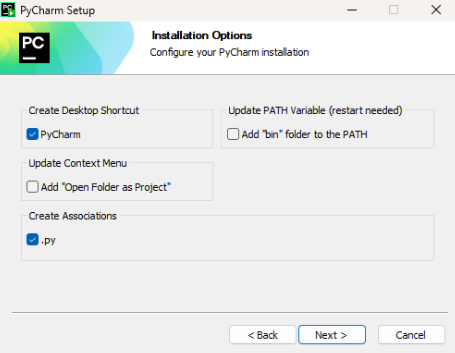
- Similar to the Python IDLE shell installer, go to the Downloads page of your device and click on the PyCharm executable to run it and complete the installation. I recommend the following settings for now (you can always change them later by re-running the installer):
- Before doing this step, you need to have a Python interpreter or a Python virtual environment so that PyCharm can read the Python code. Once you are done, create a directory with the Python interpreter and a Python file that ends with .py.

- In your new Python file (part of the directory), type whatever code you like! Experiment with the IDE and see what you can make!
Final Thoughts
If something is unclear to you, drop a comment! I will be here to help! With that being said, have fun coding!
Comments